GLP-1 tracker
GLP-1 Water Tracker
Pokii's water tracker keeps the day-to-day mechanics of hydration logging simple: set a daily goal, add water with a couple of taps, and let Apple Health carry the number the rest of the way. It sits in the Nutrition & hydration part of your dashboard in Pokii, built around a glass-based quick-add flow with an optional confetti celebration when you reach your goal for the day. This page covers how the goal, the logging, and the Apple Health sync actually work — for guidance on how much water to aim for in the first place, see Pokii's water intake calculator page.
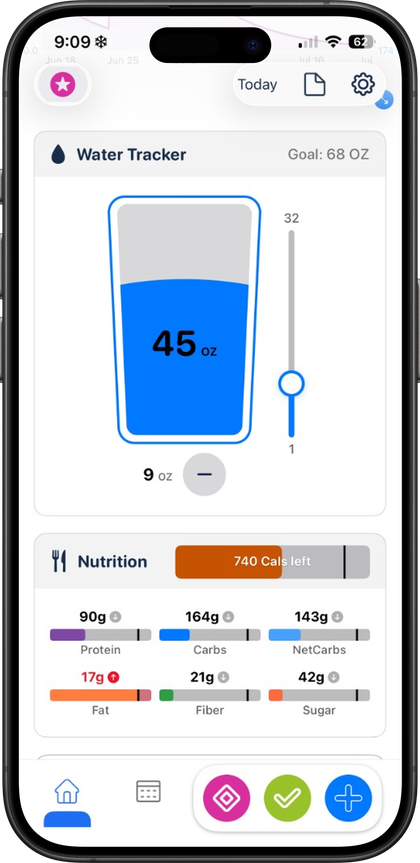
Setting a daily water goal in your preferred units
The water tracker is a feature, so lets you set a personal daily water goal and start logging against it. Once that number is set, Pokii keeps a running total for the day, and logging is glass-based — quick-add taps rather than a numeric keypad — so a drink gets logged in a couple of taps instead of typing an exact amount every time. Settings holds the app's theme picker along with weight and height units and nutrition display preferences, the same place that shapes how the rest of your numbers are shown, so your water totals line up with the same unit conventions you've already set for everything else in Pokii.
How the water module appears on your dashboard is up to you: water tracking and nutrition totals can show as separate sections, and you can reorder dashboard sections however you like — moving the water tracker higher if it's the number you check first, for example. Pokii also includes the option to combine water and nutrition into a single dashboard module instead of two separate ones, and to show or hide dashboard modules outright rather than just reordering them, so your daily goal and running total can sit exactly where you want them, or off the dashboard entirely on days you'd rather not look.
Quick-add logging and syncing to Apple Health
Logging water in Pokii is built to be fast: tap to quick-add a glass, and the running total for the day updates right away. That speed matters because the tracker isn't an isolated log sitting inside Pokii — with permission, Pokii both reads dietary water from Apple Health and writes the water you log back to Health, so the number in Pokii and the number in your Health app stay reconciled rather than tracking two separate totals. Health permissions are managed from Settings' Apple Health screen, where you can re-request authorization if you ever need to reconnect the handshake between the two apps.
Because Pokii's dashboard is set up to refresh automatically whenever related HealthKit water samples change, water logged somewhere other than Pokii — another app, or a connected device that writes to Apple Health — can show up in your daily total without you opening Pokii to add it manually. Pokii's Health access for this feature is scoped narrowly, too: dietary water, alongside body mass and nutrition macros, is what Pokii reads and writes;the sync stays focused on water and nutrition totals on your dashboard.
Why keeping water logging simple matters for the daily habit
Pokii's broader interface leans on the same idea everywhere: floating log actions on the dashboard let you quick-log a shot, a daily check-in, or open a menu for weight, body measurements, a progress photo, or a food scan without digging through menus first. The water tracker's glass-based quick add follows that same pattern deliberately — logging a drink is a couple of taps, not a form to fill out, because a hydration habit is more likely to survive a busy day if recording it doesn't take longer than actually drinking the water did.
The optional confetti celebration when you hit your daily goal is part of the same design goal: reinforcing a small win at the moment it happens rather than burying it in a weekly summary, and it's tunable — particle count and bursts can be turned down or off entirely in settings if you'd rather have a quieter dashboard. Pokii also includes smart water reminders on top of that: interval- and time-window-based nudges with pattern-based messaging, so prompts to drink are spread through the day instead of arriving as one generic alert. None of this decides what your daily goal should be; for guidance on setting that number, Pokii's water intake calculator page covers general hydration reference ranges in more depth. Here, the goal is simply making sure that once you've picked a target, actually logging toward it stays fast and out of your way.
Always follow your prescriber’s instructions for GLP-1 medications. Pokii helps you log and visualize your journey; it does not replace professional care.