GLP-1 tracker
GLP-1 Mood Tracker
Pokii's daily check-in includes a dedicated mood slider alongside appetite and side effects, plus an optional notes field for context — all part of the same iPhone and iPad app you already use to log shots, weight, and food scans. Fill in a mood check-in as often as fits your routine, add a note when something stands out, and the entry lands on your calendar next to the rest of that day's log, so a pattern or a one-off day is easy to find later instead of buried in a separate journal. This page walks through how the mood check-in works, how notes add context, and how to review mood history alongside shots and other check-ins.
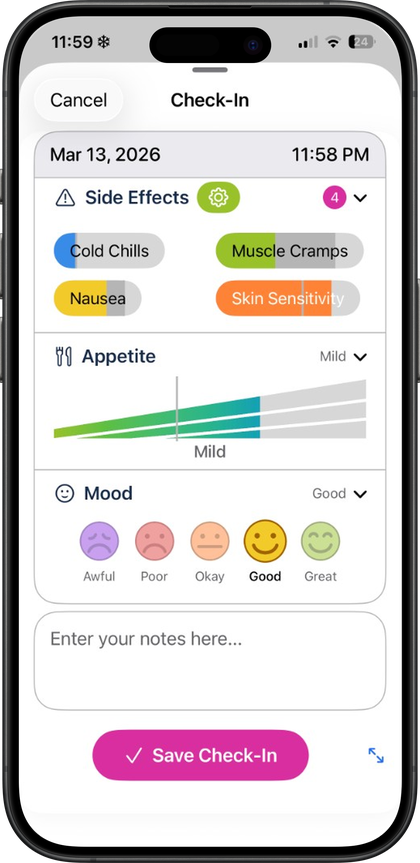
Daily mood check-ins, built into the check-in flow
Mood is one of the optional fields in Pokii's daily check-in, alongside appetite and side effects with per-effect intensity. It's a dedicated slider rather than a generic tag you pick from a list, so a check-in captures a specific mood rating rather than a vague label, and the check-in shows relative-to-last hints so you can see how today's entry compares to your previous one without doing the math yourself. None of the fields are required — you can fill in mood on its own, skip it on days it doesn't apply, or complete the whole check-in including appetite and side effects together, and mood check-ins are available in Pokii along with the rest of the daily check-in.
Starting a check-in doesn't require digging through menus. The floating log actions on the dashboard include a quick daily check-in option alongside logging a shot, so a mood entry takes a few taps from wherever you are in the app. If you'd rather not think about remembering, Pokii's daily check-in reminder fires at a time you set and automatically skips itself if you've already completed a check-in that day, so it stays useful instead of becoming a repeat notification. Rating scale settings let you adjust how the check-in scales are presented, so the mood slider and the rest of the check-in match how you personally think about rating a day.
Notes add the context a number alone can't
A slider rating tells you what the number was; a note tells you why. Pokii's daily check-in includes an optional notes field alongside mood, appetite, and side effects, so a single entry can carry both a rating and a short explanation — a rough night, a schedule change, a stressful week at work, or anything else you want attached to that specific day rather than left to memory. The note stays tied to that one check-in in your history, so when you look back later you're reading your own context from the day itself, not reconstructing it afterward.
Side effects tracking in the same check-in supports severity and notes per effect, and a custom side effects list lets you manage which effects even appear and how visible they are, so the check-in reflects the things you actually want to track rather than a fixed default list. Mood, appetite, side effects, and notes all live in the same check-in entry, so if a note explains a rough mood day, the appetite and side-effect fields from that same day sit right next to it rather than in a separate log you'd have to cross-reference.
It's worth saying plainly: Pokii doesn't tell you what a mood entry means, and this page isn't making any claim about how GLP-1 medications affect mood one way or another. Mood is simply one more thing that can shift during any significant change in routine, diet, or medication, which is a reasonable enough reason to have a place to jot it down alongside everything else you're already tracking — nothing more specific than that.
Reviewing mood history on the calendar
Individual check-ins are useful in the moment, but the bigger picture shows up when you look back. Pokii's Calendar tab has both a month view and a list view, and it shows shots, check-ins, photos, weight, body measurements, and food scans together rather than mood living in its own separate screen — tap any day to open and edit what you logged, including the mood and notes from that check-in. On the dashboard, Today's log section pulls the same idea into a single unified timeline for whichever day you're viewing, so a mood check-in from this morning sits in the same list as a shot you logged this afternoon.
Because mood, notes, side effects, and shots are all part of one continuous history rather than four separate apps, scrolling back through Calendar's list view is enough to see how check-ins line up with dose days over weeks or months, without any interpretation built in — you're looking at your own entries, in order, exactly as you logged them. If you want a portable copy, Pokii's configurable PDF progress report can include mood alongside appetite, side effects, notes, shots, and weight in one export, with saved reports kept in-app so you're not regenerating the same document repeatedly. Everything backs up automatically through iCloud sync, and a manual or scheduled Pokii JSON export gives you an additional copy of the full history — mood entries included — if you ever restore on a new device.
Pokii is a tracking and education tool, not a source of medical advice, diagnosis, or treatment, and that applies to mood the same as it does to every other field in the app: it's a place to record what you're noticing, not to interpret it for you.
Always follow your prescriber’s instructions for GLP-1 medications. Pokii helps you log and visualize your journey; it does not replace professional care.