GLP-1 tracker
GLP-1 Food Tracker
Pokii's food tracker logs nutrition on the same timeline as GLP-1 shots. Scanning the nutrition label on packaged food is the recommended path—it is usually more accurate than guessing from a barcode or a quick photo alone. You can also capture meals in-app when label scanning is not an option. Edit the AI estimate before saving, and the entry lands in the same daily log used for shots, check-ins, and weight.
Label scanning (recommended)
Food scanning is one of the floating log actions on the dashboard, next to quick log shot, daily check-in, weight, body measurements, and progress photo. For packaged foods, photograph the nutrition facts label so Pokii can read serving size and macros directly. Pokii's AI builds an estimate you can adjust before anything is saved—label scanning is what Pokii recommends when you want dependable numbers without maintaining a separate food database.
The feature uses camera access and dietary Health permissions the first time you log food; scan images are stored through iCloud Drive rather than a third-party ad server.
Meal capture when there is no label
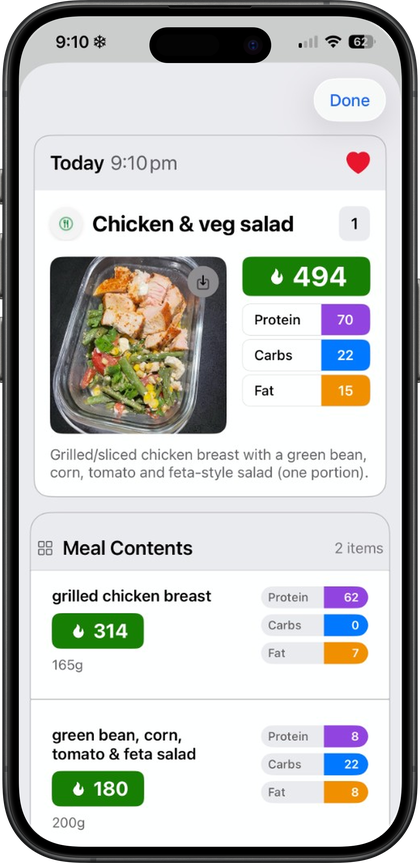
When you are eating something without a readable label—a restaurant plate, a shared dish—you can still log with in-app meal capture and edit the estimate before save. Label-first, meal-second is the workflow Pokii is built around: use the label when you have one, use meal capture when you do not.
Meal and label entries work alongside custom nutrition targets and the combined water and nutrition dashboard module. Nutrition totals pulled from Apple Health also show on the dashboard whether the entry came from a Pokii scan or another Health-connected app.
Edit the estimate, then find it in your daily log
An AI estimate is a starting point, not a final answer, so Pokii lets you edit nutrition details before anything is saved. Once you confirm an entry, it writes to Apple Health and appears in Today's log—the dashboard's unified timeline for the selected day that also lists shots, check-ins, photos, weight, and body measurements in one scroll.
Food scans also show up on the Calendar tab in month or list view. Tapping an earlier entry opens it for editing if a portion or ingredient was off.
Macros sync through Apple Health, not a second food app
With permission, Pokii reads dietary water, calories, protein, carbohydrates, fat, fiber, sugar, and sodium from Apple Health, and writes body mass, dietary water, and nutrition macros from Pokii food logging back to Health. The nutrition dashboard refreshes when related HealthKit samples change.
Why keep food and shots in one place
Pokii's Today's log keeps shots, check-ins, weight, body measurements, progress photos, and food scans on the same date-scoped timeline. That consolidation runs on the same privacy approach as the rest of Pokii: no ads, no public social feed, and structured data syncing through your personal iCloud account. Pokii is a tracking and education tool; it does not provide medical advice, diagnosis, or treatment.
Pokii is a tracking and education tool. It does not provide medical advice, diagnosis, or treatment. Talk with your clinician about dosing, side effects, and any change to your plan.