GLP-1 tracker
GLP-1 Shot Tracker App
Pokii is a GLP-1 shot tracker for iPhone and iPad: log every injection (or oral dose) with reminders, injection-site rotation, projected medication levels between doses, weight on the same timeline, and optional Shotsy import—without ads or a public social feed.
Quick answer
- Log shots in seconds: Time, medicine, dose, site, optional pain; full edit history; oral meds skip site/pain fields.
- Stay on schedule: Per-medicine reminders, overdue and shot-day banners, home-screen widgets.
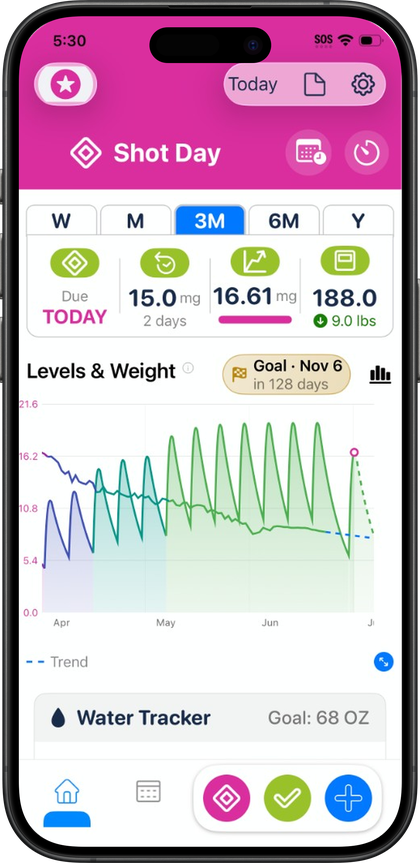
- See the curve: Projected levels chart with Combined / Per Medication / Per Compound modes (educational PK model, not lab values).
- Sites and comfort: Front/back body map with rotation suggestions; room-temperature timer on shot day.
- Progress: Weight, check-ins, photos, measurements, PDF reports; backup via iCloud and Pokii JSON.
Log every shot in seconds
Every entry in Pokii captures the details that actually matter on dose day: time, strength, medication, injection site, and an optional pain rating, with a full edit history behind each one so a correction days later does not erase the original record. Oral doses like Wegovy Pill follow the same timeline as injectables, just without the site and pain fields, since those only apply to injectable shots. A built-in medication library covers branded options such as Zepbound, Mounjaro, Ozempic, and Saxenda alongside older entries like Victoza, Trulicity, Bydureon, and Tanzeum, so switching medications does not mean starting a new log from scratch. You can track multiple active medications at once for anyone juggling more than one prescription.
Flexible shot schedules mirror however your prescription actually works: a fixed interval, selected weekdays, or per-weekday doses, each with its own reminder time and the ability to set a custom next-shot date when a refill or provider visit shifts the plan. Overdue and shot-day banners surface on the dashboard automatically when a dose is due or late, with a deep link straight into rescheduling instead of a generic notification you have to hunt down.
Titration and dose history, tracked to the compound
Titration is rarely a straight line, and Pokii's built-in medication library reflects that: branded entries like Zepbound, Wegovy, Mounjaro, and Ozempic sit alongside compounded options such as Tirzepatide (Compound) and Semaglutide (Compound), grouped by pharmacokinetics so a brand switch does not break your history. You can also add fully custom medications with their own half-life, Tmax, and bioavailability, and choose whether that custom drug shows up on the projected-levels chart at all, plus set custom colors per dose strength so the chart, widgets, and dose picker all match at a glance.
The projected levels chart itself can display Combined totals, one line per medication, or grouped Per Compound so branded and compound versions of the same molecule read as one trend instead of two, and it pans, pinch-zooms, and expands to full screen with tooltips that snap to the curve as you drag. Before committing to a schedule change, Pokii's shot scheduler lets you add simulated doses to preview how a new interval or strength would shift the chart, then clear them or convert them into real logged shots once you are ready. Dosage history and weight-by-dose stats tie every past strength to the results around it, with full per-dose history unlocked in Pokii.
Injection-site rotation and pain, on one timeline
Injectable therapy adds a second timeline that oral meds skip entirely: where you injected and how it felt. Pokii's injection site body map shows front and back views, highlights your last site, and can suggest the next rotation spot automatically, with an optional prompt when you log a new shot so rotation is not something you have to remember on your own.
An optional pain slider on each injectable log lets you flag tenderness without turning every entry into a paragraph, and that pain data can be included in PDF reports if you want a clinician to see the same pattern you are noticing. Because oral doses do not involve a site, Pokii keeps that field out of the log entirely for oral entries like Wegovy Pill, so the injection history stays specific to shots that actually need rotation. On shot day itself, a room-temperature timer with configurable presets counts down before you inject a pen that has been warming up, then rings an alarm when it is ready.
Weight and progress alongside dose history
Weight on GLP-1 therapy tends to move in steps tied to dose changes, which is why Pokii plots weight points directly on the same medication timeline as your shots rather than in a separate app. A target weight line overlays the chart so you can compare a titration week against your goal trajectory, and Pokii also includes a smoothed weight trend line with a projected date to reach that target based on your actual pattern. Weight check-ins can be entered manually or synced automatically from Apple Health, so the chart stays current without double entry.
My Journey pulls weight, body measurements, and progress photos into one hub alongside BMI context and days on program, so a plateau on the scale does not erase inch-level progress from waist, hip, chest, neck, arm, thigh, or ankle measurements. Progress photos are viewable and capturable without limit in Pokii. When you want a clinician to see the same view you do, Pokii's configurable PDF report can include projected levels, weight, target weight, shots, injection sites, pain, side effects, appetite, mood, notes, and body measurements in one export, with past reports saved in-app for later reference.
Reminders, widgets, and a dashboard that matches your routine
Shot reminders fire at the time set in each medication's schedule, and a separate daily check-in reminder skips itself automatically if you have already logged for the day. The Shot Progress home screen widget shows cycle progress and next-shot timing at a glance, and Pokii includes the Next Shot chart widget with a full medication level view rather than a compact preview. Alarm sounds for timers, a theme picker, and your preferred weight and height units round out the details you only have to set once.
The dashboard itself is built to reorder around however you use it: Free lets you rearrange sections like the chart, water, nutrition, and My Journey, while Pokii also includes the ability to show or hide modules entirely and combine water and nutrition into a single section. Everything backs up automatically through iCloud sync, with manual or scheduled Pokii JSON backups and one-tap iCloud restore protecting years of history when you change phones. Switching from Shotsy or a spreadsheet is a matter of importing the Shotsy JSON export or a header-based CSV rather than rebuilding a timeline by hand, and Pokii runs a duplicate-detection pass after any import so repeated entries get flagged for review and cleanup instead of cluttering your history. The same native layout adapts to iPad, so the whole setup travels with whichever device you have on hand.
Pokii is a tracking and education tool. It does not provide medical advice, diagnosis, or treatment. Talk with your clinician about dosing, side effects, and any change to your plan.