GLP-1 tracker
GLP-1 Progress Photos in Pokii
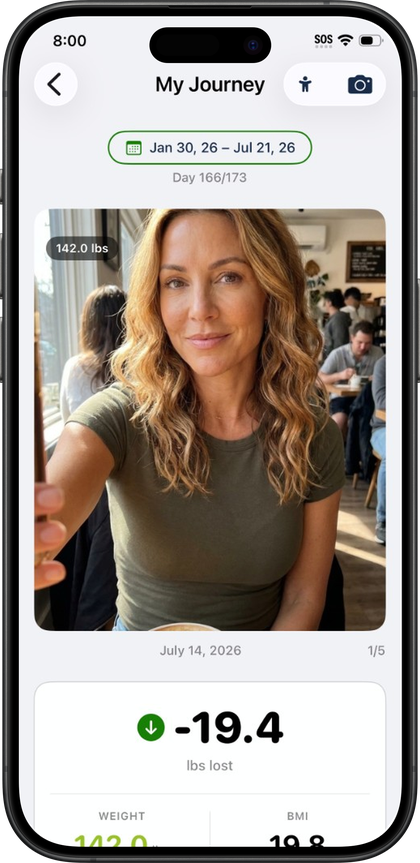
A scale number and a chart line only tell part of the story of a GLP-1 journey — sometimes the clearest evidence of change is a photo. Pokii's progress photos live inside the My Journey hub, where each dated image sits alongside the weight you logged around the same time, so you can look back and see the two side by side instead of hunting through your camera roll for context. Every photo you take stays tied to your own iCloud account rather than any public or social feed.
Adding a progress photo without leaving your routine
Progress photos are logged the same way as the rest of Pokii's daily tracking. The floating log actions on the dashboard include a quick menu for weight, body measurements, progress photo, and food scan, right alongside the buttons for logging a shot or a daily check-in. That means adding a new photo doesn't require digging into a separate section of the app — it's one tap from wherever you already are, the same as logging a dose or a check-in.
You can capture new progress photos from the same floating log menu as shots and check-ins, and earlier photos stay in your My Journey gallery for as long as you use the app. Nothing about logging a photo asks you to leave your dashboard or dig through settings to find it.
Where photos live: the My Journey gallery
Once a photo is logged, it becomes part of a dated carousel with weight context — scrolling through your progress photos in the My Journey hub shows each image next to the weight entry closest to that date, so a visual change and a number change show up together instead of in two different places. My Journey is also where weight, BMI context, days on program, and body measurement entry points live, so photos aren't tracked in isolation; they sit next to the other signals — waist, hips, chest, neck, arm, thigh, and ankle measurements among them — that make up the fuller picture of a journey.
Photos also surface outside of My Journey itself. The Calendar tab's month and list views show progress photos alongside shots, check-ins, weight, body measurements, and food scans on the days they were logged, with a tap into any past entry to review it. The dashboard's daily log section does something similar for the day you're currently viewing, pulling shots, check-ins, photos, scans, and weight into one unified timeline. Wherever you're looking in Pokii, a progress photo isn't off in its own tab — it's woven into the same daily record as everything else you're tracking.
Your photos stay private, synced through iCloud
Pokii doesn't run ads and doesn't have a public social feed, so progress photos are never something other users can browse or that get pulled into any kind of shared timeline. Structured tracking data in Pokii syncs through your personal iCloud account, and progress photos specifically are stored through iCloud Drive rather than a third-party media server. In practice, that means your photos live in your own iCloud account the same way any other file in your iCloud Drive would, available to devices signed into that account, and not visible to anyone else using the app.
That storage approach also means a progress photo you capture isn't something you have to think about separately from the rest of your Pokii data. There's no extra step to keep it private — there's no public feed to opt out of in the first place, and no ad-driven server sitting between your photo and your own iCloud account. Whether you're capturing a new photo or scrolling back through months of history, the photos in your My Journey gallery stay exactly where you put them: next to your weight, on the dates you logged them, and visible only to you.
Pokii is a tracking and education tool. It does not provide medical advice, diagnosis, or treatment. Talk with your clinician about dosing, side effects, and any change to your plan.