GLP-1 tracker
Overdue GLP-1 Shot Reminders
Pokii is built to notice the moment your GLP-1 schedule slips, not just to remind you ahead of time. Once a shot schedule is in place, Pokii tracks your next-shot countdown against it, and if a dose is due today or has already passed its expected day, that status surfaces directly on your dashboard and home screen widget, so you always know where you stand without digging through settings or trying to remember your own cadence.
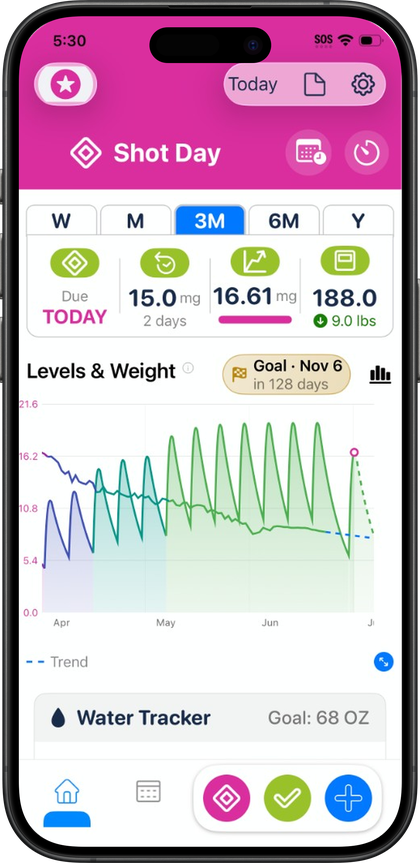
How Pokii detects and flags an overdue shot
Every Pokii schedule is set per medicine, using either a recurring interval or specific weekdays, along with a reminder time you choose. That schedule is what Pokii checks your logged shots against to work out whether you are on track, due today, or running late. When a dose crosses into due-or-late territory, Pokii shows an overdue or shot-day banner right on your dashboard, the date-scoped daily hub that already gathers your shots, check-ins, and other logged activity for the day. Because the banner lives on the same screen you land on when you open the app, there is no separate overdue section to check or notification history to scroll back through; the status is simply there.
This detection works the same way whether you are tracking an injectable or an oral medication, since Pokii's shot tracking logs the date, time, medicine, dose, and any notes for either type, and keeps a full edit history. If you are tracking more than one medicine, each one carries its own schedule and its own reminder time, so the overdue banner reflects the specific medication that has slipped rather than a single generic alert. Anyone tracking multiple GLP-1 medications still sees each one's status tracked against its own cadence rather than lumped together.
The banner is paired with Pokii's per-medicine shot reminders, which fire from the reminder time set in that medicine's schedule. So the notification that nudges you and the banner that greets you when you open the app are both drawing from the same underlying schedule, rather than one being a generic daily alert disconnected from your actual dosing pattern.
Shot-day status at a glance, with a direct path to reschedule
Beyond simply flagging that something is off, the dashboard banner tells you which state you are in: whether today is shot day or whether the dose is now overdue. That distinction matters because it changes what you need to do next, and Pokii surfaces it without making you cross-reference the calendar yourself. Tapping the banner deeplinks you straight into rescheduling the dose, so getting back on track is a single tap from the dashboard rather than a multi-step trip through your medication settings to find where the schedule lives.
Once you are in the reschedule flow, the same flexible scheduling options you set up originally are available: you can set a custom next-shot date to nudge the calendar without rebuilding your recurring pattern, or adjust the interval or selected weekdays if your routine has changed more permanently. Because the dashboard's next-shot countdown, current dose, and days-on-dose display all pull from that same schedule, updating it from the banner's deeplink keeps everything, the countdown, the Calendar tab's month and list views, and your reminders, in sync rather than showing conflicting information in different corners of the app.
When you do log the shot, whether right on schedule or after the banner has already appeared, Pokii records it with the same date, time, medicine, dose, and notes fields it uses for any other entry, and keeps that in your edit history. A late shot is captured accurately for what it was rather than backdated to when it was originally due, so your history and your projected medication level chart continue to reflect what actually happened.
Seeing overdue status without opening the app
The dashboard banner is not the only place shot-day status shows up. Pokii's Shot Progress home screen widget, available in Pokii, displays your cycle progress, next shot date, current dose, and days on that dose directly on your iPhone or iPad home screen, drawing from the same next-shot countdown that powers the in-app dashboard. Because the widget and the dashboard read from the same underlying schedule and logged shots, a dose that is due or overdue is reflected on your home screen just as it would be if you opened the app, without needing a notification to prompt you first.
The Next Shot chart widget places a version of Pokii's projected medication level chart on your home screen alongside the Shot Progress widget. Since Pokii's data syncs across devices through iCloud, a shot logged on your iPhone updates the countdown your iPad's widget shows as well, so the status you glance at throughout the day, on whichever device is nearby, matches what the dashboard banner would tell you if you opened the app. As with the rest of Pokii, this status tracking is meant to support your own routine and is not medical advice; any change to your actual dosing regimen should still come from your care team.
Pokii is a tracking and education tool. It does not provide medical advice, diagnosis, or treatment. Talk with your clinician about dosing, side effects, and any change to your plan.