Alternatives
MyFitnessPal Alternative for GLP-1 Users
MyFitnessPal has been a food-logging app for close to two decades, and in April 2026 it added a GLP-1 Support feature that lets you log your medication brand, dose, and injection details alongside your meals. If you're on Zepbound, Wegovy, Mounjaro, Ozempic, or a compounded GLP-1 and wondering whether MyFitnessPal's new feature is enough, or whether you need something built specifically for dose and injection tracking, here's an honest breakdown of what each app actually does.
What MyFitnessPal is genuinely good at
MyFitnessPal's core strength is still its food database and barcode scanner, and that's a real, long-established advantage. Scanning a barcode and pulling up nutrition data instantly is but the scale of the underlying database is why MyFitnessPal has built its reputation as one of the most widely used nutrition and food tracking apps in the US. It also runs on iOS, Android, and the web, so households or couples on different phones can both use it, which matters if that's a requirement for you.
MyFitnessPal connects to Fitbit, Garmin, and Apple Health to pull in exercise, steps, weight, and sleep data, giving you a broader activity picture than a medication-focused app will. Worth knowing before you connect: it doesn't backfill your history, so only data logged after you link an account shows up. MyFitnessPal also publishes registered-dietitian-authored content aimed specifically at GLP-1 users, covering things like calorie, protein, fiber, and hydration guidance while on medication, which is a nice touch if you want educational nutrition content in the same app where you're logging food.
What GLP-1 Support actually does and doesn't do
GLP-1 Support launched in April 2026 and is free to all US users, though it's currently English-only. It lets you log your GLP-1 brand, your last dose in milligrams, the date and time, and an injection location, with an optional weekly reminder and a basic side-effects checklist alongside your food diary. For a food-logging app bolting on a medication feature, that's a reasonable starting point, and it costs nothing extra.
But it's worth being precise about the scope, because MyFitnessPal is explicit about it: drug information is entered by you, and the app states plainly that it does not verify medication, doses, timing, or safety, and does not alert you to missed or extra doses, risks, interactions, contraindications, or side effects. In practice, the medication log is a simple entry list, not a pharmacokinetic model. There's no chart projecting how much medication is likely in your system between doses, no built-in drug library beyond a generic "your GLP-1 prescription" entry, and no way to set custom pharmacokinetic values for a compounded product. Injection location is a text or dropdown field, not a visual body map with rotation guidance. There's no scheduler that lets you preview or simulate an upcoming dose on a chart before you log it, and dosing is currently mg-only, which is a real limitation if you're on a compounded or unit-dosed product. In short, GLP-1 Support is a companion note-taking feature next to your food log, not a dedicated dose-tracking tool.
Where Pokii differs
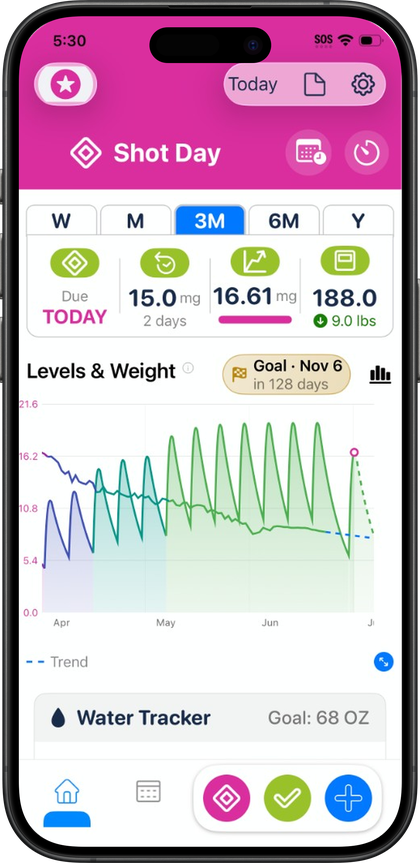
Pokii is built the opposite way around: the medication tracking is the core product, and nutrition is the secondary, Apple Health-linked feature. Every shot you log feeds a projected medication-levels chart, an educational curve showing roughly how much medication is likely active between doses, viewable as a combined total, per medication, or per compound (grouping different brand names that share the same molecule). Pokii ships 16 built-in medications, including Zepbound, Wegovy, Wegovy Pill, Foundayo, Mounjaro, Ozempic, Tirzepatide and Semaglutide compounds, Retatrutide, Saxenda, Rybelsus, Victoza, Trulicity, CagriSema, Bydureon, and Tanzeum, and You can define custom medications with their own half-life, Tmax, and bioavailability, useful for compounded products that don't fit a standard profile.
Where MyFitnessPal has a dropdown for injection site, Pokii has a front-and-back body map in Pokii, with rotation suggestions and an optional auto-prompt when you log a shot, so you're not guessing where you injected last. Pokii also includes a shot scheduler that lets you preview a simulated future dose directly on the chart before you commit to it, a room-temperature pen timer for warming injections before use, a weight trend line with a projected target date tied to the same chart as your medication data, and configurable PDF progress reports you can bring to appointments. The dashboard itself is reorderable in Pokii and fully configurable (show/hide modules, combine sections) in Pokii.
On nutrition, the apps solve different problems. Pokii includes built-in food logging—nutrition label scanning (recommended for accuracy), plus meal capture when needed—with AI macro estimates on Today's log beside shots, written to Apple Health. MyFitnessPal's edge is its enormous legacy item database and barcode-based diary UX, plus GLP-1 Support as a medication note next to meals—not a projected-level chart or injection-site map. If you only need a huge searchable database and a basic dose field, MyFitnessPal can suffice; if you need pharmacokinetic tracking, rotation, and visit PDFs with meals in the same app, that's Pokii. Pokii is on iPhone and iPad today with Android in active development; MyFitnessPal covers more platforms if you need Android or web today.
Switching apps: what migration actually looks like
If you're thinking about moving from MyFitnessPal to Pokii, it's worth knowing the export and import situation plainly rather than assuming it'll be seamless. MyFitnessPal's CSV export requires a paid MyFitnessPal subscription (Premium or Premium+), and it comes as three separate files (meal-level nutrition details, progress history, and exercise history) emailed as a zip. As of the most recently documented update to MyFitnessPal's export FAQ, those three files were the only ones listed, with no mention of a GLP-1 or medication log file. Since GLP-1 Support launched after that documentation was last confirmed updated, whether your dose history is included in the export is genuinely unconfirmed, not something either app has stated one way or the other.
On Pokii's side, import options include a Pokii JSON backup, iCloud restore, Shotsy JSON import, and a generic header-based CSV import built for Pokii's own backup schema. None of these is a verified MyFitnessPal-format adapter, so there's currently no confirmed, ready-made path to bring your MyFitnessPal food or dose history straight into Pokii. If you switch, plan on manually re-entering your recent dose history in Pokii to get your projected-levels chart started, rather than expecting an automatic import.
Given all that, the recommendation depends on what you actually want tracked. If you need MyFitnessPal's mega-database and cross-platform access, and a basic GLP-1 note next to meals is enough, its GLP-1 Support may cover that. If you want your medication tracked with a projected-levels chart, injection-site rotation, dose scheduling, built-in food logging, and PDF progress reports for clinician visits, that's Pokii's job—and you may not need a second food app at all. Some users still keep MyFitnessPal for database search; that's a preference, not a Pokii limitation on in-app meals.
Always follow your prescriber’s instructions for GLP-1 medications. Pokii helps you log and visualize your journey; it does not replace professional care.