Free tools & guides
Injection Site Rotation Guide in Pokii
Pokii's injection site body map is built around one simple idea: rotation should be something you can see, not something you have to remember. Every time you log an injectable shot, you can mark exactly where it went on a front or back body map, and Pokii carries that detail forward by highlighting your last site the next time you go to log a dose. Paired with a suggested next site and dose colors that carry through the chart, widgets, and dose picker, the body map turns the routine question of where you injected last time into something you glance at rather than try to recall from memory.
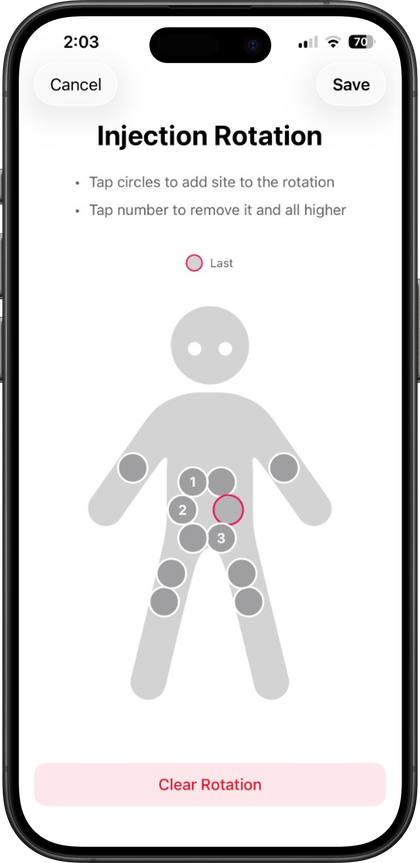
Logging a site and seeing your last one highlighted
When you log an injectable shot in Pokii, alongside the date, time, medication, and dose you're already recording, you can select where you injected on the body map's front or back view. This applies to injectable medications only; oral doses like Wegovy Pill skip the site field entirely, since it doesn't apply to a pill. Rotation settings let you shape how the map behaves for your routine, and an optional auto-prompt can ask you to pick a site automatically whenever you log a new shot, so the step doesn't get skipped on a day when you're logging quickly through the floating log action.
Once you've logged a site, the body map does the remembering for you. It highlights your last injection site the next time you open it, on either the front or back view, so the spot you used most recently is visually obvious before you pick your next one. That's the core of how Pokii supports rotation day to day: instead of trying to recall whether last week's shot was your left thigh or your right abdomen, you can look at the highlighted site and choose somewhere else, without keeping a mental log of your own history.
Every logged shot, site included, keeps a full edit history, so fixing a mistaken site days later doesn't erase the original record. That day's entry also shows up in Today's log section on the dashboard alongside any check-ins, weight, or other entries from the same day, so the site you injected isn't a detail you have to dig for later; it's already sitting in the same timeline as the rest of what you tracked that day.
Suggested next site and dose colors, at a glance
Beyond marking your last site, Pokii's body map can suggest a next site for you, based on your rotation settings, so you don't have to work out on your own which area hasn't been used in a while. Combined with the optional pain slider available on every injectable log, that suggested rotation also becomes a place to start noticing patterns. If a particular site or area tends to come with more soreness noted in your pain ratings, seeing that tied to a specific spot on the map, versus a freshly suggested one, makes it easier to bring up with your prescriber later.
Dose colors add another layer of at-a-glance recognition to the same routine. Pokii ships with default dose colors built into the medication library in Pokii, and You can set their own custom colors per dose strength, colors that then carry through the projected-levels chart, home screen widgets, and the dose picker you use when logging a shot. Seeing the same color tied to a given strength everywhere in the app, on the chart, on a widget, and in the log entry itself, makes it easier to recognize a dose change or a particular strength's history at a glance rather than reading dose numbers every time. If you're in Pokii, injection sites and pain ratings can also be included in your configurable PDF progress reports, so the same rotation pattern you're tracking day to day is easy to hand a prescriber in one document.
Why rotation matters, briefly
Manufacturer instructions for GLP-1 and GIP injectables are consistent on one point: change your injection site with each dose rather than reusing the same spot, largely because repeated injections in one small patch of skin can affect that tissue over time. Pokii's body map is built to make that standard practice easier to follow in daily use rather than something you have to work out from scratch on shot day. For the fuller picture on why rotation is recommended and what site reactions can look like, see Pokii's injection site reactions and pain tracking guide.
Always follow your prescriber’s instructions for GLP-1 medications. Pokii helps you log and visualize your journey; it does not replace professional care.