GLP-1 tracker
Customizable GLP-1 Dashboard Modules
Pokii's dashboard is a date-scoped daily hub made of modular sections, and none of those modules are locked into one order or one look. You can rearrange which sections show up first, assign your own colors to different dose strengths so they read consistently everywhere in the app, and decide how much (if any) celebration shows up when you log a shot, finish a check-in, or hit your water goal. None of this changes what's being tracked underneath — it's the same dose history and check-in timeline either way — it just changes how that information is presented back to you day to day.
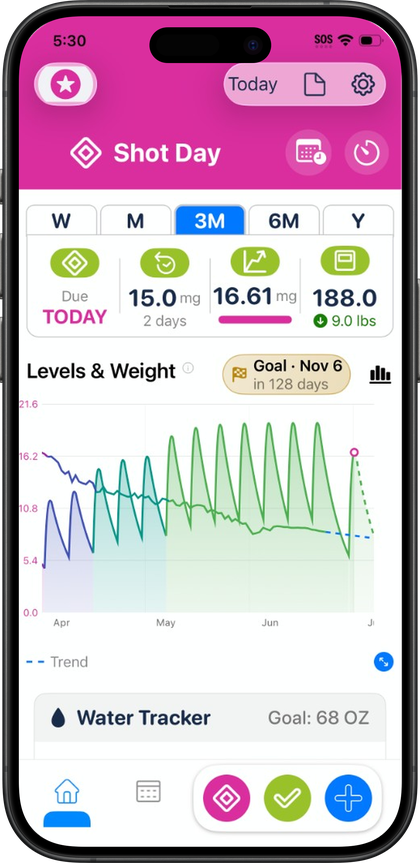
Reorder and hide dashboard modules
You can reorder the sections on your dashboard, including the water tracker, nutrition dashboard, medication level chart, and My Journey entry points. If you check your water intake constantly but only glance at the projected-levels chart once a week, you can move water higher on the page and push the chart lower, so the first screen you see matches what you actually use daily rather than a fixed default layout.
You can lets you show or hide dashboard modules outright, not just reorder them — so a module you don't use isn't just lower on the page, it's gone entirely. That's useful any time you want a simpler dashboard, but it matters most during sensitive weeks: if daily weight or nutrition numbers feel like too much some weeks, hiding those modules for a while keeps the dashboard focused on what you want to see without deleting any underlying data — everything you've hidden is still logged and still available in Calendar and My Journey, it's just off the home screen. Pokii also offers a combined water-and-nutrition module, so those two sections can live under one header instead of two separate ones if you'd rather cut down on scrolling.
Custom dose colors across chart, widgets, and picker
Titration usually means more than one strength shows up on your projected-levels chart over time, and Pokii's custom dose colors feature is built around keeping that legible. You choose a color per dose strength, and that same color shows up in three places at once: the medication level chart, your home screen widgets, and the dose picker you use when logging or scheduling a shot. Instead of reading a legend or a dose number to figure out which segment of the chart corresponds to which strength, the color itself becomes the shortcut — useful on shot day when you're moving fast and would rather not stop to double-check.
This pairs with Pokii's other chart-coloring option, coloring the chart by dose or by medicine, and with the chart's existing display modes — combined totals, per medication, or per compound, which groups branded medications by the same underlying molecule. Together, these settings mean that as your dose changes over a titration schedule, the chart keeps telling a clear visual story about which strength was active when, rather than turning into one flat curve that blurs every change together.
Confetti celebrations, and how to control them
Configurable confetti is a feature, and it's more than a single log-a-shot animation: it can trigger on logged shots, on completed check-ins, and on hitting your daily water goal. The idea is to give small, easy-to-miss wins — a shot logged on schedule, a check-in filled out, a hydration goal actually met — a moment of visible acknowledgment, which matters more than it sounds like it should over a long titration phase where day-to-day progress is otherwise hard to see.
It's also entirely optional. Particle count and the number of bursts are both tunable in settings, so you can turn the effect down if you want something more subtle, or turn it off completely if you'd rather have a quieter, more clinical dashboard. There's no single "right" amount — some people want visible reinforcement for sticking to a routine, others just want to log data without animation, and Pokii's settings support either preference without affecting anything else about how shots, check-ins, or water goals are tracked.
It's all presentation on top of the same data
Reordering modules, recoloring doses, and adjusting confetti are all settings-level changes — they affect how your dashboard looks and feels, not what Pokii is actually recording. Your shot history, check-in timeline, and chart data stay exactly the same regardless of which modules are visible, which colors you've assigned, or whether confetti is on, dialed down, or off. That separation is deliberate: the goal is a dashboard that fits how you personally want to interact with your GLP-1 tracking, without ever asking you to trade away the underlying record to get it.
Always follow your prescriber’s instructions for GLP-1 medications. Pokii helps you log and visualize your journey; it does not replace professional care.