GLP-1 tracker
Custom Medications and Doses in Pokii
Pokii ships with a built-in library of GLP-1 and GIP medications, but not everyone's regimen fits neatly into a preset list. Custom medications let you add a drug profile that isn't already in Pokii, choose whether it's taken orally or by injection, and give it a dose color so it stays visually distinct across your chart, calendar, and widgets.
Pokii's built-in medication library
Pokii's built-in library covers Zepbound, Wegovy, Wegovy Pill, Foundayo, Mounjaro, Ozempic, Tirzepatide (Compound), Semaglutide (Compound), Retatrutide, Saxenda, Rybelsus, Victoza, Trulicity, CagriSema, Bydureon, and Tanzeum. These branded and compound entries are grouped by pharmacokinetics, so Pokii can plot projected medication levels and let you switch between viewing your data as Combined totals, Per Medication, or Per Compound, which groups branded names that share the same underlying molecule.
For most people tracking a standard GLP-1 or GIP regimen, this list covers it, and the app's projected level curves, dose picker, and history are already wired up for those entries. Every entry, built-in or custom, also gets its own flexible shot schedule: an interval or selected weekdays, per-weekday doses, a custom next-shot date, and its own reminder time, since Pokii tracks schedules per medicine rather than one schedule for the whole app.
A custom entry becomes useful when what you're taking isn't on the list. That's what the custom medications feature is for: it lets you define a drug profile from scratch rather than mapping your regimen onto the nearest built-in match. Onboarding already asks new members whether they're on an injectable, an oral medication, or unsure, so the idea of a medication type outside the standard set is built into how Pokii introduces itself, even before you reach the custom medications screen in settings.
Adding a custom medication as oral or injectable
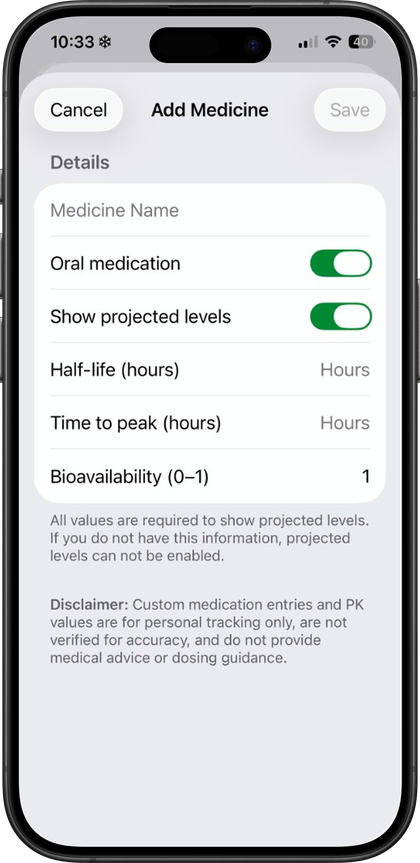
Custom medications are built into Pokii. When you add one, Pokii asks you to fill in the same underlying profile it uses for built-in entries: an oral toggle to mark the medication as a pill or an injection, plus half-life, Tmax, and bioavailability fields that drive the projected level chart. You can also choose whether the medication shows up on the level chart at all.
The oral/injectable toggle isn't just a label — it changes what the logging flow looks like. Injectable entries get the injection site body map and an optional pain slider when you log a shot; oral entries skip both of those steps since there's no injection site or pain to record. Everything else, including shot history, reminders, and the daily log, works the same regardless of which type you pick.
Because custom medications share the same pharmacokinetic fields as the built-in library, they slot into Pokii's existing tools rather than sitting off to the side. A custom medication can appear in the shot scheduler, where you can plan a dose ahead of time and preview it on the chart as a simulated shot before you actually log it, and it shows up in the Today's log section alongside check-ins, weight, and photos on the day you record a dose. Shot markers and medication-change flags on the timeline also apply to custom entries, so switching medications or adjusting a dose is visible on the chart, not just in your history list.
Half-life, Tmax, and bioavailability are the same inputs Pokii uses internally to build the projected level curve for built-in medications, and the app is explicit that those curves are an educational model, not a lab result — worth keeping in mind when you're entering the numbers for something Pokii doesn't already know.
Assigning a dose color to keep medications distinct
Once a medication, built-in or custom, is part of your regimen, Pokii lets you assign custom dose colors: user-chosen colors per dose strength that carry across the chart, widgets, and the dose picker. This is especially useful once you're tracking more than one medication or comparing doses of the same medication over time, since Pokii's chart can color segments either by dose strength or by medicine.
Dose colors aren't cosmetic only — they're what make the Per Medication and Per Compound level views easy to read at a glance, and the chart's tooltips can switch into a per-medication mode that follows the same color key as you drag along the curve. That color coding extends to the Shot Progress and Next Shot chart widgets on your home screen, so the setup you do inside the app stays visible without opening it, and it's the same color key you'll see in the dose picker when you're logging a shot or reviewing shots and medication changes in the calendar's month and list views.
You can track multiple active medications, use custom dose colors and chart coloring by dose or medicine, and choose week, month, 3-month, 6-month, or year date ranges for the dashboard chart. When you're running more than one medication, or mixing a built-in entry with a custom one, each stays visually distinct wherever it appears in Pokii.
Always follow your prescriber’s instructions for GLP-1 medications. Pokii helps you log and visualize your journey; it does not replace professional care.