GLP-1 tracker
GLP-1 Check-In Reminders
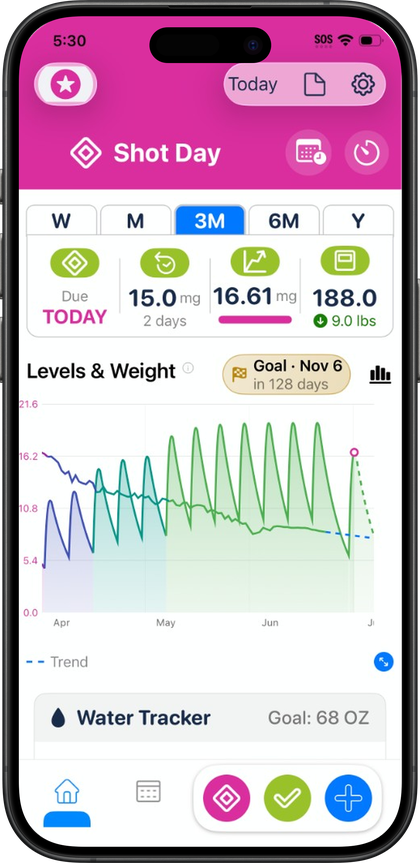
Pokii uses time-based push reminders to prompt a daily check-in and per-medicine shot reminders drawn from each medication's own schedule, so tracking does not depend on remembering. A reminder that has already been satisfied does not repeat: the daily check-in reminder is skipped automatically if a check-in was already completed that day. On the dashboard, overdue and shot-day banners back up the push notifications with a visual cue whenever a dose is due or running late, with a deeplink to reschedule it. None of this replaces medical guidance from a provider; it is a tracking layer that keeps entries current.
Setting up a daily check-in reminder
The daily check-in reminder is a free, time-based notification tied to a preferred check-in time. Because it is skip-aware, it will not nag after the day's check-in is already logged, which keeps the notification useful instead of repetitive. When the reminder does fire, it points back to a check-in flow that covers optional side effects with an intensity rating per effect, plus appetite, mood, and free-form notes. Each of these fields includes relative-to-last hints, so a check-in shows how today compares to the previous entry rather than standing alone.
Logging in response to the reminder is meant to be quick. The floating log actions on the dashboard surface a daily check-in option alongside quick log shot and the menu for weight, body measurements, progress photos, and food scans, so a check-in from a push notification is a short flow rather than a detour through settings. Once logged, the entry appears in Today's log section, the unified timeline on the dashboard that lines up shots, check-ins, photos, scans, and weight for the selected day. That timeline is also where a skipped or missed check-in becomes visible at a glance, since the day's entries are laid out together rather than buried in separate tabs.
Side effect visibility in check-ins is also configurable. The custom side effects list lets someone manage which effects show up during a check-in, and the rating scale settings control how those check-in scales are presented, so the reminder leads to a form that matches what someone actually wants to track rather than a fixed list of fields.
Shot-day alerts and overdue banners
Shot reminders work per medicine, pulled from that medication's own schedule rather than a single app-wide setting. Since Pokii supports flexible shot schedules per medicine — interval-based or specific weekdays, per-weekday doses, a custom next-shot date, and its own reminder time — each medication's push reminder can be timed independently of any others being tracked at the same time.
Alongside the push notification, the dashboard shows overdue and shot-day banners whenever a dose is due or has gone past due, with a deeplink that leads straight to rescheduling it. This gives shot timing a second, always-visible signal on the dashboard in addition to the one-time push alert. For the shot itself, a room-temperature timer offers presets (roughly 15 to 45 minutes) on the shot-day flow with a countdown and alarm, intended for the wait while a refrigerated pen warms to room temperature before injecting. The alarm style used for that countdown, and for other timers, is configurable in settings.
For a quick glance without opening the app, the Shot Progress home screen widget shows cycle progress, the next shot, and a level snippet, and it's available in Pokii. Between the per-medicine push reminder, the dashboard banners, and the home screen widget, shot timing surfaces in more than one place rather than depending on a single notification being seen.
Why consistent reminders matter more than any single feature
None of these reminders are useful in isolation — their value comes from how they add up to steady logging over time. The daily check-in's relative-to-last hints only mean something if there is a "last" to compare against, which depends on check-ins happening regularly rather than in occasional bursts. The same is true of dosage history and stats, and of the projected medication level curves on the charts, which are educational models built from logged doses rather than lab results — the more consistently a shot schedule is followed and logged, the more those charts and history reflect what's actually happening.
Pokii backs this up outside of the reminder system itself. The Get Started guide includes coach tooltips and celebrations after a first shot and first check-in, nudging a new user toward the habit early rather than leaving reminders as the only prompt. Configurable confetti on shots, check-ins, and water goals adds a small positive signal each time an entry gets logged, which is a minor detail on its own but reinforces the same pattern the reminders are aiming for. Over weeks and months, that accumulated, consistent data — side effects tied to dose timing, weight check-ins, notes — is also what feeds into PDF progress reports in Pokii, where the same fields captured from a reminder-prompted check-in can be included in a report.
In other words, the daily check-in reminder, the per-medicine shot reminders, and the overdue and shot-day banners are not really three separate features. They're different angles on the same goal: making it easier to log consistently, since consistent logging is what makes every other part of Pokii's tracking useful.
Always follow your prescriber’s instructions for GLP-1 medications. Pokii helps you log and visualize your journey; it does not replace professional care.