Product
Pokii for iPad: Native GLP-1 Tracking
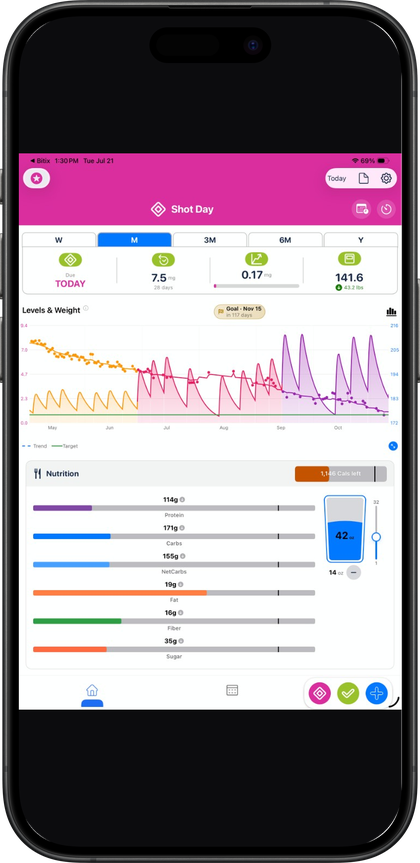
Pokii on iPad is the same universal iOS app as iPhone—one iCloud-backed timeline—with a layout built for large screens: full-screen medication level charts, roomy dashboard modules, and easier titration history review. Android is in development; there is no web logging client yet.
Quick answer
- Same app, same data: iPhone + iPad; sync via iCloud.
- iPad strengths: Full-screen PK chart, pan/zoom, more visible dashboard modules.
- Same features: Shots, levels, widgets, PDF reports, import/backup.
- Android: Coming soon (in active development).
A native layout, not a stretched phone screen
Pokii ships as one universal app across iPhone and iPad — Android is in active development separately — so the iPad experience is the same underlying iOS app adapted to a larger canvas rather than a different product. Every builtin medication, every check-in field, and every chart setting works the same way on both devices; what changes on iPad is the layout built around them.
That's most visible in the medication level chart. Pokii's projected levels chart supports pan and pinch-zoom navigation, plus a full-screen mode that opens a display options menu so you can adjust what's showing without backing out of the expanded view. Chart tooltips can be dragged or snapped along the curve to read exact values at a point in time. On an iPad's larger screen, that full-screen chart mode has more room to actually show the shape of a curve — whether you're viewing Combined totals, Per Medication, or Per Compound (which groups branded medications like Zepbound and Mounjaro by the same underlying molecule) — instead of squeezing weeks of data into a few inches of phone screen.
Why the bigger screen helps with titration history and multiple medications
Pokii keeps a per-dose dosage history with weight-by-dose insights, and Pokii includes the full history rather than a recent slice. Reviewing that history — spotting how a dose change lined up with a shift in weight or side effects over a titration schedule — is easier with an iPad's expanded chart and history views than on a phone-sized screen where you're paging through entries one at a time.
The same is true if you're tracking more than one medication at once. You can track multiple active medications, and the chart's Combined, Per Medication, and Per Compound display modes are built to keep multiple medications legible on the same timeline. Custom dose colors and coloring the chart by dose or by medicine carry through to the chart, widgets, and dose picker, so each strength or medicine reads as its own color rather than an unlabeled line. On a larger iPad display, those colored segments and the legend around them have more room to breathe, which matters most exactly when there's more than one curve to compare.
The dashboard benefits the same way. You can reorder dashboard sections — the water tracker, nutrition dashboard, medication level chart, and My Journey entry points — to match what you actually check first, show or hide modules outright, and combine the water and nutrition sections into a single module instead of two separate ones. With more dashboard sections visible at once on an iPad, that customization has a more immediate, visible payoff than it does on a phone where most sections are already a scroll away.
iPhone and iPad stay in sync through iCloud
Pokii's data syncs across devices through your personal iCloud account. Log a shot, complete a check-in, or update your weight on your iPhone, and it's available on your iPad without any manual step — and the reverse is true too, so switching to the bigger screen for a full-screen chart review doesn't mean switching data sets. Progress photos sync through iCloud Drive alongside the rest of your structured data.
That same account also carries your backups. Pokii's JSON export and restore, including the option for scheduled backups and one-tap restore from iCloud, works from either device, so a backup made on your iPhone can be restored on an iPad and vice versa. Everything described here stays inside that same universal app and the same iCloud-synced dataset, regardless of which screen you're using it on.
Always follow your prescriber’s instructions for GLP-1 medications. Pokii helps you log and visualize your journey; it does not replace professional care.