Product
Apple Health and Pokii
Pokii connects to Apple Health for weight, water, and nutrition: with permission, it reads body mass, macros, dietary water, and lean mass (chart overlay), and writes weight, water, and meal-scan nutrition back to Health. GLP-1 dose history stays in Pokii, synced through your iCloud account.
Quick answer
- Reads (with permission): Weight, nutrition macros, water, lean mass (overlay only), DOB/sex for context.
- Writes: Body mass, dietary water, nutrition from meal scanning.
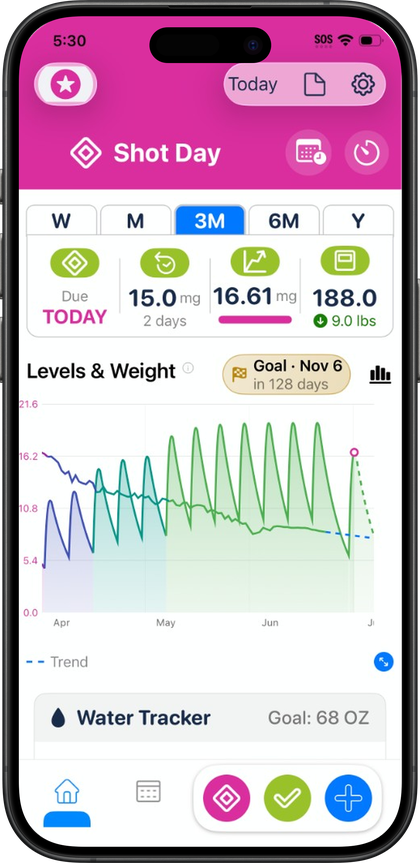
- Shots: Logged in Pokii (iCloud sync), alongside your Health totals on the dashboard.
- Optional: You can use Pokii without Health; grant or change access anytime in Settings → Apple Health.
What Pokii reads from Apple Health
With permission, Pokii reads body mass, dietary water, and a set of nutrition macros — calories, protein, carbohydrates, fat, fiber, sugar, and sodium. It also reads two characteristics, date of birth and biological sex, which are used for context rather than shown as tracked metrics. Pokii additionally reads lean body mass so it can overlay that data on the medication level chart; lean body mass is read-only for the overlay and is not written back to Health.
These reads feed the parts of Pokii you'd expect: your weight check-ins can reflect a weigh-in logged in Health, and the nutrition dashboard pulls calories, protein, carbs, fat, fiber, sugar, and sodium totals for the day from HealthKit rather than asking you to re-enter them. Water tracking works the same way — dietary water logged in Health (or logged from Pokii, since it writes there too) shows up in the water module. Pokii also observes these HealthKit categories for changes, so if a nutrition or water sample updates elsewhere, the dashboard refreshes rather than showing stale numbers.
What Pokii writes back to Apple Health
Pokii writes body mass, dietary water, and full nutrition macros — calories, protein, carbs, fat, fiber, sugar, and sodium. Weight check-ins you log in Pokii sync out to Health as body mass, so a single weigh-in entry is available to any other app that also reads weight from HealthKit rather than being siloed inside Pokii.
The nutrition and water writes are most visible through Pokii's meal scanning feature: photograph a meal, let the AI estimate its nutrition, edit the estimate if needed, and save it. That save writes the resulting macros to Apple Health, which is also why the nutrition dashboard totals update immediately afterward — Pokii is reading back the same numbers it just wrote. Water logged through Pokii's water tracker writes out the same way, so a glass logged in Pokii is reflected in Health's dietary water total for the day.
Shots, widgets, and your other apps
GLP-1 dose and shot history live in Pokii's own log, synced through iCloud, while weight and nutrition can round-trip through Health when you grant access. That narrow footprint is meant to sit alongside step counters, sleep apps, or workout trackers you already use — Pokii focuses on the GLP-1 loop and the macros that matter on your dashboard.
If you'd rather not grant Health access at all, that's fine too — Health authorization is offered as an optional step during onboarding, and permissions can be reviewed or re-requested later from Settings → Apple Health. Pokii's core shot tracking, check-ins, and charts work without it; you'd just be entering weight and nutrition manually instead of syncing them.
Pokii is a tracking and education tool. It does not provide medical advice, diagnosis, or treatment. Talk with your clinician about dosing, side effects, and any change to your plan.