Product
Pokii Features for GLP-1 Tracking
Pokii on iPhone and iPad logs GLP-1/GIP shots, projects medication levels between doses (educational PK model), tracks check-ins and weight, syncs nutrition via Apple Health, and exports configurable PDF reports—no ads, no public social feed.
Quick answer
- Core: Shot log with site map and reminders; 16+ built-in meds + custom PK profiles; oral and injectable.
- Charts: Projected levels (Combined / Per Medication / Per Compound); weight trend; simulated doses on the scheduler.
- Daily loop: Side effects, appetite, mood; water and nutrition from Health + AI meal scanning.
- Progress: Photos, measurements, My Journey, home screen widgets.
- Data: iCloud sync, Pokii JSON backup, Shotsy JSON import.
Logging every shot, site, and symptom
Shot tracking is Pokii's core: log injectable and oral doses with date, time, medicine, dose, and notes, and every entry keeps a full edit history. The built-in medication library covers branded and compound GLP-1 and GIP options — Zepbound, Wegovy, Wegovy Pill, Foundayo, Mounjaro, Ozempic, Tirzepatide (Compound), Semaglutide (Compound), Retatrutide, Saxenda, Rybelsus, Victoza, Trulicity, CagriSema, Bydureon, and Tanzeum — grouped by pharmacokinetics so related doses line up correctly. You can also add custom medications with their own half-life, Tmax, bioavailability, an oral toggle, and a setting for whether that medication shows up on the level chart.
Injectable shots come with an injection site map showing the front and back of the body, rotation settings, a suggested next site, and an optional auto-prompt when logging so sites rotate automatically; an optional pain slider can be logged per injectable shot as well. Oral doses skip both the site map and the pain slider, since neither applies to a pill. Each medicine runs on its own flexible schedule — an interval or specific weekdays, per-weekday doses, a custom next-shot date, and its own reminder time. You can track multiple active medications at once. A room-temperature timer with presets and an alarm helps with warming a pen before injecting, dashboard banners flag when a dose is overdue or due today, and per-dose history with weight-by-dose insights is available throughout.
Charts that project your medication levels
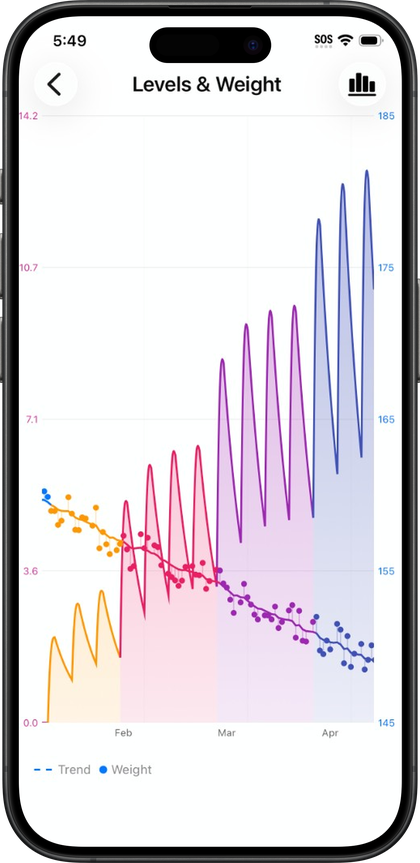
The projected medication levels chart is Pokii's signature feature: an educational pharmacokinetic curve estimating how much medication is active in the body between doses. Pokii treats this as a modeled estimate, not a lab result — the curve can be turned on or off, and it's scroll-limited to the start of a user's tracked journey. It can be viewed in three display modes: Combined totals, Per Medication, or Per Compound, which groups branded medications by their underlying molecule, useful for anyone tracking more than one GLP-1 or GIP medicine at once.
Charts support pan and zoom, a full-screen view with a display options menu, and drag-or-snap tooltips along the curve, including a per-medication tooltip mode. A current level summary card keeps a combined readout aligned with whatever the chart tooltip shows, and shot markers and medication-change flags mark injections and medicine switches directly on the timeline. You can color the chart by dose strength or medicine, use fully customizable dose colors that carry through to widgets and the dose picker, and use a shot scheduler with simulated dose projections that preview hypothetical future shots on the chart until they're cleared or actually logged. The home dashboard chart supports week, month, 3-month, 6-month, and year date ranges. Weight dots plot on the same timeline along with a target-weight goal line, a smoothed weight trend line, projected trajectory, estimated goal date, and an optional lean body mass overlay read from Apple Health for chart context only.
Daily check-ins and side-effect tracking
Beyond shots, Pokii includes an optional daily check-in for side effects, appetite, mood, and notes. Each side effect can be logged with its own intensity, and check-ins show relative-to-last hints for context. The list of side effects tracked is fully customizable, so which effects appear — and how visible they are — is up to the user, and appetite and mood get their own dedicated sliders rather than being folded into generic side-effect tags. Side effect severity and notes tie back to dose timing in both the in-app history and PDF reports, which makes it easier to spot patterns around a particular dose or a medication change.
Everything logged for a given day — shots, check-ins, progress photos, food scans, weight, and more — appears together in a unified Today's log section on the dashboard, and the Calendar tab offers both a month view and a list view for browsing or editing past entries. Rating scale settings let users adjust how check-in scales are presented, so the daily check-in habit can be tuned to fit how someone actually wants to record how they're feeling, rather than forcing one fixed format.
Nutrition, Apple Health, and progress tools
Pokii connects to Apple Health to pull calories, protein, carbs, fat, fiber, sugar, and sodium into a nutrition dashboard, along with dietary water and body mass; it also reads lean body mass for chart context only and date of birth and biological sex for personalization. You can photograph a meal and let AI estimate its nutrition, edit the results before saving, and have those values write back to Apple Health so dashboard totals stay in sync, with custom macro targets and a combined water-and-nutrition dashboard module. The water tracker — glass-based quick add, a daily goal, and optional confetti when the goal is hit — works alongside smart, pattern-based water reminders.
The My Journey hub brings together weight, BMI context, days on program, and entry points for progress photos and body measurements. Progress photos appear in a dated carousel alongside weight context, with unlimited new captures over time. Body measurements cover waist, hips, chest, neck, arm, thigh, and ankle, each with its own history and trend, and weight check-ins are logged manually or sync automatically from Apple Health when it's enabled.
Built for iPhone and iPad
Pokii is a native iPhone and iPad app. It runs with no ads and no public social feed; structured data syncs privately through your personal iCloud account, and progress photos sync through iCloud Drive. Two home screen widgets are available: the Shot Progress widget, showing cycle progress, next shot, and a level snippet, and the Next Shot chart widget with the full medication level chart. Configurable PDF progress reports let you choose which sections to include—projected levels, weight, target weight, shots, injection sites, pain, side effects, appetite, mood, notes, daily log, body measurements, and stats cards—useful for a clean summary to share at a clinician visit, along with a saved-reports list to revisit past exports.
Getting started doesn't require rebuilding history from scratch: Pokii can restore from a Pokii JSON backup, import a Shotsy JSON export, or import from CSV, with duplicate detection and cleanup running after any import.
Pokii is a tracking and education tool. It does not provide medical advice, diagnosis, or treatment. Talk with your clinician about dosing, side effects, and any change to your plan.