Product
Pokii FAQ: GLP-1 Shot Tracker
Pokii FAQ in short: GLP-1 shot tracker for iPhone and iPad. Free download, optional subscription, no ads; no public social feed. Backs up via iCloud and optional Pokii JSON export; can import Shotsy JSON or CSV for dose history. Projected medication levels are an educational model, not lab results.
Quick answer
- Platforms: iPhone and iPad on the App Store today; Android coming soon (in active development).
- Privacy: No ads; no public social feed; structured data via your iCloud account.
- Backup: Automatic iCloud sync plus optional full JSON backup/restore.
- Import: Shotsy export (.json / .shotsyjson) and header-based CSV (dose-related fields; see in-app import screen).
- Not medical advice: Pokii tracks and visualizes; it does not prescribe or diagnose.
Is Pokii free?
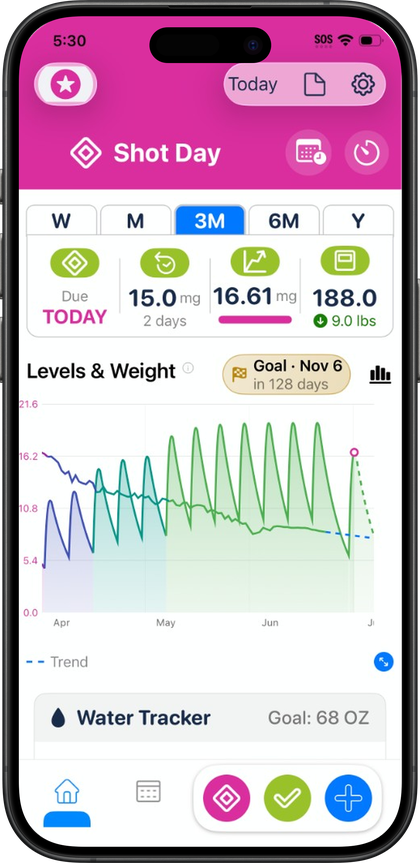
Pokii is on the App Store for iPhone and iPad: free download, optional subscription, no ads. The app is built for the full GLP-1 tracking loop: shot logging with per-medicine reminders, weight check-ins, the projected medication-level chart, the built-in medication library (including Zepbound, Wegovy, Mounjaro, Ozempic, and compounded semaglutide and tirzepatide), water and nutrition totals synced from Apple Health, a next-shot countdown with current dose and days-on-dose, the Shot Progress and Next Shot home screen widgets, dashboard modules you can show, hide, or reorder, chart weight points and a target-weight line, AI meal and label scanning, custom nutrition targets, progress photos, body measurements, configurable PDF progress reports, and full in-app charts and history. Optional App Store subscriptions support ongoing development; see pricing for how download and access work.
Does Pokii work on Android?
Android is coming soon — we're actively building it. Today Pokii is a universal native app for iPhone and iPad on the App Store, with an iPad-oriented layout rather than a stretched phone interface. There is no Google Play listing yet. Pokii also does not ship as an Apple Watch app or web client; shot logging, charts, and the Shot Progress and Next Shot home screen widgets run on iPhone and iPad. See Is Pokii on Android? for platform details.
How does Pokii back up my data?
Pokii backs up your data in two layers that work together. First, your structured tracking data (shots, check-ins, weight, body measurements, and more) syncs automatically through your personal iCloud account, so a signed-in device stays current without any manual step. Progress photos sync separately through your own iCloud Drive. Second, Pokii can generate a full Pokii JSON backup on top of that iCloud sync: you can export it manually and share it however you like through the standard share sheet, turn on an optional daily auto-backup so a fresh export exists without having to remember, and restore your entire dataset from that JSON file if you ever need to. There's also a one-tap "restore from iCloud" path in the import settings for getting back onto a synced device quickly after a reinstall or a new device setup. Whichever path you use — iCloud restore, JSON restore, or an import from another source — a duplicate-detection and cleanup review runs afterward so you can check for and remove duplicate entries before they clutter your shot history.
Can I import from Shotsy or CSV?
Yes, both are supported as import sources. Pokii can import a Shotsy export (.json or.shotsyjson) and convert it into Pokii's own data structures; the import screen documents which fields are supported and which aren't, and the Shotsy import screen lists which fields import, focused on dose and shot history. Pokii also supports a header-based CSV import, which gets converted into Pokii's own backup format the same way a Shotsy file does. One thing to be clear on: on the export side, Pokii currently only exports your own data as a Pokii JSON file through the share sheet, either manually or on a scheduled auto-backup — there's no CSV export option today, so a CSV import is a one-way path into Pokii rather than a round trip. As with any restore, imported data goes through the same duplicate-detection and cleanup review before it's finalized, so a re-import or a file with overlapping entries won't silently double up your shot history.
Does Pokii share my data or show ads?
Pokii doesn't run ads, and there's no public social feed where your entries could be seen by other users. Your structured tracking data syncs privately through your personal iCloud account, and progress photos sync through your own iCloud Drive — there's no ad-driven social server involved in any of it. On the Apple Health side, Pokii only requests the specific permissions it needs: with your permission, it can read body mass, lean body mass (used only as a read-only chart overlay, never written by Pokii), dietary water, calories, protein, carbohydrates, fat, fiber, sugar, sodium, and your date of birth and biological sex, and it can write body mass, dietary water, and full nutrition macros captured from meal scanning back to Health so your dashboard totals stay current.. You can revisit and re-request these permissions any time from Settings → Apple Health. It's also worth remembering that Pokii is a tracking and education tool, not a source of medical advice, diagnosis, or treatment — its projected medication-level curves are educational models built from your logged doses, not lab results.
Always follow your prescriber’s instructions for GLP-1 medications. Pokii helps you log and visualize your journey; it does not replace professional care.