Product
Pokii Home Screen Widgets
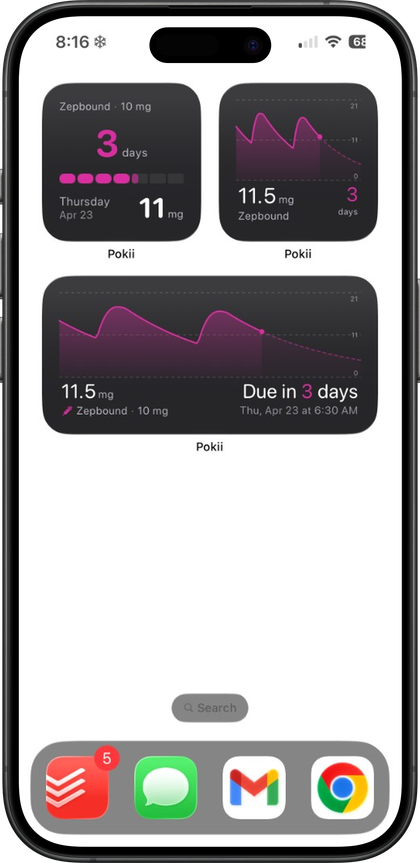
Pokii widgets on iPhone and iPad show next-shot timing and a snippet of your projected level chart on the home screen—Shot Progress (countdown + cycle) and Next Shot (chart widget), synced via iCloud with the app.
Quick answer
- Shot Progress widget: Cycle progress, next shot, dose/days-on-dose, level snippet.
- Next Shot widget: Medication level chart on the home screen.
- Data source: Same shots and schedules you log in Pokii; updates when you log.
- No Apple Watch widget—iPhone and iPad home screen only.
What the widgets show
The Shot Progress widget is available in Pokii and gives a compact read on where you are in your current cycle. It shows a cycle progress indicator, your next shot date, and a short snippet of your projected medication level, along with your current dose and how many days you have been on it. Because Pokii's built-in medication library assigns a default color to each dose, the progress bar reflects the dose color for whatever you are currently taking, so a glance tells you both timing and strength.
The Next Shot chart widget places a version of Pokii's medication level chart on your home screen, with custom dose colors that carry over to the widgets and dose picker, not just the in-app chart, so the coloring you choose in one place is the coloring you see everywhere, including your home screen.
Pokii tracks both injectable and oral GLP-1 medications, drawing from a built-in library that includes Zepbound, Wegovy, Mounjaro, Ozempic, and compounded tirzepatide and semaglutide, among others, so the widgets reflect whichever medication and dose you currently have active — including when you switch between medications over time.
How the widgets stay in sync
Pokii's widgets are built from the same underlying data as the rest of the app. When you log a shot, with its date, time, medicine, and dose, that entry updates your schedule, which is what the next-shot countdown and cycle progress on the widget are calculated from. There is no separate widget setup or manual refresh step: the countdown and progress reflect whatever is currently logged in your history.
Your data moves between your iPhone and iPad through iCloud sync, since Pokii's data syncs through your personal iCloud account. If you log a shot on your iPhone, that shot is part of the same underlying record your iPad's widget draws from, keeping next-shot timing and dose color consistent across your devices without extra steps. These widgets are built for iPhone and iPad home screens.
Dose colors follow the same logic as the rest of the sync model: they come from the built-in medication library by default, or from your own custom choices in Pokii, and either way, that is what the Shot Progress widget's coloring and the Next Shot chart widget's curve reflect once you have made a change in-app.
Why a glanceable widget matters for shot-day consistency
Shot-day logistics are easy to lose track of when your schedule lives only inside an app you have to remember to open. Pokii already builds reminders around each medicine's schedule, with per-medicine shot reminder times and dashboard banners when a dose is due or overdue. A home screen widget extends that same next-shot awareness to a place you look throughout the day anyway, without needing a notification to prompt you.
The next-shot countdown and current dose and days-on-dose display on the Shot Progress widget give every Pokii user a visible answer to when their next shot is and what dose they are on, right from their home screen. For anyone timing a room-temperature timer before injecting a warmed pen, or simply trying to avoid a missed or duplicated dose, having that countdown and dose color visible at a glance, rather than a few taps away, removes a small piece of friction from a routine that otherwise depends on memory. As with the rest of Pokii, the projected levels shown are an educational model rather than a medical measurement, and the widgets are meant to support your own tracking, not replace guidance from your care team.
Pokii is a tracking and education tool. It does not provide medical advice, diagnosis, or treatment. Talk with your clinician about dosing, side effects, and any change to your plan.