Product
Getting Started with Pokii
Getting started with Pokii: Install on iPhone or iPad, complete onboarding (medication + schedule + goals), log your first shot from the + button, then reorder dashboard modules so next-shot countdown, levels chart, and nutrition match how you actually use the app.
Quick answer
- Download from the App Store and walk through onboarding—pick your GLP-1/GIP drug (or add a custom profile), set interval or weekday reminders, and optional Apple Health access.
- Log a shot with date, time, dose, site (injectables), and notes; use the room-temperature timer if you warm a pen from the fridge.
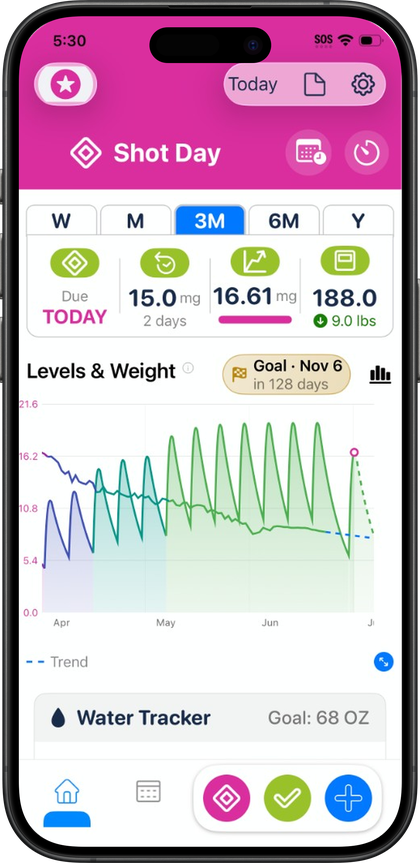
- Check the dashboard for next-shot countdown, projected levels (educational curve), and water/nutrition from Health.
- Customize module order and visibility; add widgets for Shot Progress and the level chart.
- Backup is automatic via iCloud; optional Pokii JSON export in settings for an extra copy.
Onboarding: adding a medication and choosing a schedule
Onboarding starts with a few questions about your goals and whether you're on an injectable medication, an oral one, or still deciding, before moving into medication and schedule setup, height, weight, and target weight, a comparison chart, and a personalized projection based on what you've entered. Near the end, onboarding asks about connecting Apple Health and enabling notifications.
Pokii's built-in library covers branded and compound GLP-1 and GIP entries, including Zepbound, Wegovy, Wegovy Pill, Foundayo, Mounjaro, Ozempic, Tirzepatide (Compound), Semaglutide (Compound), Retatrutide, Saxenda, Rybelsus, Victoza, Trulicity, CagriSema, Bydureon, and Tanzeum, each with default dose colors already set up. If what you're taking isn't listed, you can add a custom medication with an oral toggle, half-life, Tmax, bioavailability, and whether it appears on your projected-levels chart. You can track multiple active medications at once, each with its own schedule.
Each medication gets its own schedule: an interval (every so many days) or specific weekdays, with per-weekday doses if your regimen varies, a custom next-shot date if you're mid-cycle already, and a reminder time. If you're tracking more than one medication at once, each keeps its own cadence and reminder independent of the others.
Logging your first shot
Once setup is done, Pokii's Get Started guide sticks around for a bit with coach tooltips and small celebrations for milestones like your first logged shot, your first check-in, and customizing the dashboard, so the first few sessions have some built-in guidance rather than dropping you into an empty log.
Logging a shot is available from the floating log action button, which also has quick access to a daily check-in, weight, body measurements, a progress photo, or a food scan. A shot entry records the date, time, medicine, dose, and any notes, and every entry keeps a full edit history if you need to correct something later. For injectable medications, logging also brings up an injection site body map with front and back views, rotation settings, and a suggested next site, with an optional auto-prompt so you're reminded to pick a site each time; an optional pain slider is available too, and that pain data can later show up in PDF reports. Oral medications skip both the site map and the pain slider, since neither applies. If you've just taken a pen out of the fridge, the shot-day flow also offers room-temperature timer presets (roughly 15 to 45 minutes) with a countdown and alarm before you inject. Once a dose is logged or coming due, the dashboard surfaces overdue and shot-day banners that deep-link back to reschedule or log.
Setting up your dashboard
The dashboard is a date-scoped daily hub built from modular sections, with a toolbar date picker and links out to reports and settings. A Today's log section pulls everything from the selected day — shots, check-ins, photos, scans, weight — into one unified timeline.
Which modules matter most varies by person, but the ones most people lean on early are the next-shot countdown with current dose and days on dose, the projected-levels chart with weight points and a target weight line, and the water and nutrition totals pulled from Apple Health. You can reorder dashboard sections or show and hide modules so the ones you check most often sit at the top, including a combined water-and-nutrition module and smart, pattern-based water reminders when you want them.
Pokii sets shot reminders per medicine based on each schedule, and a daily check-in reminder that skips itself automatically if you've already checked in that day, with configurable timer alarm sounds. The Shot Progress widget shows cycle progress, next shot, and a level snippet on your home screen; the Next Shot chart widget puts your medication level chart there too. If you connected Apple Health during onboarding, Pokii reads body mass, lean body mass (chart overlay only, never written back), dietary water, calories, protein, carbohydrates, fat, fiber, sugar, sodium, and your date of birth and biological sex, and writes body mass, dietary water, and full nutrition macros when you log a food scan..
Always follow your prescriber’s instructions for GLP-1 medications. Pokii helps you log and visualize your journey; it does not replace professional care.