Product
PDF Progress Reports in Pokii
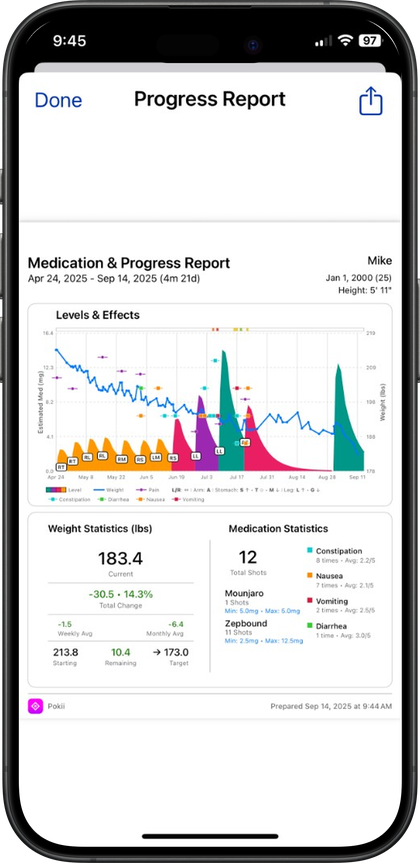
Pokii PDF progress reports bundle shots, optional projected levels, weight, injection sites, side effects, and more into one shareable PDF. You choose which sections to include, save past reports in-app, and bring the PDF to clinician visits.
Quick answer
- You pick sections: Levels, weight, shots, sites, pain, check-ins, measurements, daily log, etc.
- Source data: What you already log in Pokii—no separate form.
- Oral meds: Injection site/pain sections omit when not applicable.
- Saved reports: Regenerate or reuse prior PDFs from the app.
Exactly what you can include in a report
Pokii's PDF progress report is built around a settings screen where you turn sections on or off—not a fixed template. You can include projected medication levels, weight, and target weight to show trend and trajectory; shots, injection sites, and pain to document dosing and injection-site rotation; and side effects, appetite, mood, and notes to bring along the qualitative detail from your daily check-ins.
Beyond those, you can add your daily log — the same unified timeline of shots, check-ins, photos, scans, and weight that appears on your dashboard — plus body measurements (waist, hips, chest, neck, arm, thigh, and ankle) and stats cards that summarize your numbers at a glance. Because injection site and pain only apply to injectable medications, they simply don't appear if you're tracking an oral GLP-1 like Wegovy Pill or Rybelsus. Every section is optional, so a report can be as focused as a single weight trend line or as complete as a multi-page summary — it's your call which sections belong in the PDF.
Side effects, appetite, and mood in a report come straight from your daily check-ins, where you already log intensity per effect alongside notes and relative-to-last hints, so the PDF isn't a separate data-entry chore — it's a formatted view of what you were already tracking day to day. If you've customized which side effects show up in your check-ins, that customization carries through to the report too. And if you're tracking more than one medication, projected levels can reflect however you already view your chart — combined totals, per medication, or per compound when two brand names share the same underlying molecule.
Picking a date range and generating your report
Pokii's dashboard is date-scoped by design — the toolbar date picker you use every day to move around your history is the same entry point that links out to reports and settings, so building a report starts from a screen you're already familiar with. From there, choose the sections you want for the stretch of time you're reporting on, and Pokii assembles them into a single PDF using the shot, check-in, weight, and measurement data already stored in the app.
Once a report is generated, you don't have to rebuild it every time you need it. Saved reports keeps previously generated PDFs available in-app, so you can pull up last month's summary without recreating it, or generate a fresh one right before an appointment if your data has changed since the last export. Reports live alongside your other data rather than on some separate service — Pokii has no ads and no public social feed, and the structured data behind every report syncs privately via iCloud on your iPhone or iPad.
Because report generation reads from data you're already logging — shots, weight check-ins, body measurements, and daily check-ins — there's nothing extra to fill out before you export. If you've been consistent about logging, your report reflects that history immediately; if a section is thin because you haven't logged much of it yet, you can simply leave that section out rather than submitting an incomplete-looking page.
Why a printed page beats scrolling through your phone
Handing a clinician your unlocked phone during a telehealth call or an in-person visit means scrolling through charts, tapping between tabs, and hoping you land on the right day before the appointment moves on. A Pokii PDF report front-loads that work: shots and doses sit next to the days they happened, side effect severity and appetite and mood ratings line up against injection dates instead of being buried in separate check-in entries, and injection site history is laid out so a provider can see rotation patterns at a glance instead of asking you to describe them from memory.
It's worth remembering what the report is and isn't. Pokii is a tracking and education tool — it doesn't provide medical advice, diagnosis, or treatment, and the projected medication levels shown in a report are educational models, not lab results. What a structured PDF does give you is a clean, shareable starting point for the conversation: a stats-card summary of the highlights, a weight and target-weight trend for the bigger picture, and as much or as little day-to-day detail as you chose to include when you built it. Bring that instead of a phone, and the appointment can start with your data instead of a screen unlock.
Always follow your prescriber’s instructions for GLP-1 medications. Pokii helps you log and visualize your journey; it does not replace professional care.