Free tools & guides
First Month on GLP-1: Pokii Checklist
Your first month on a GLP-1 is when the app either becomes a habit or gets abandoned after week two, and the difference usually comes down to thoughtful setup early on. This is a practical checklist for getting Pokii configured in that first month: what to add during week one, which daily check-in fields are worth using from day one, which reminders to turn on so you're not relying on memory, and what to look at once the month wraps up.
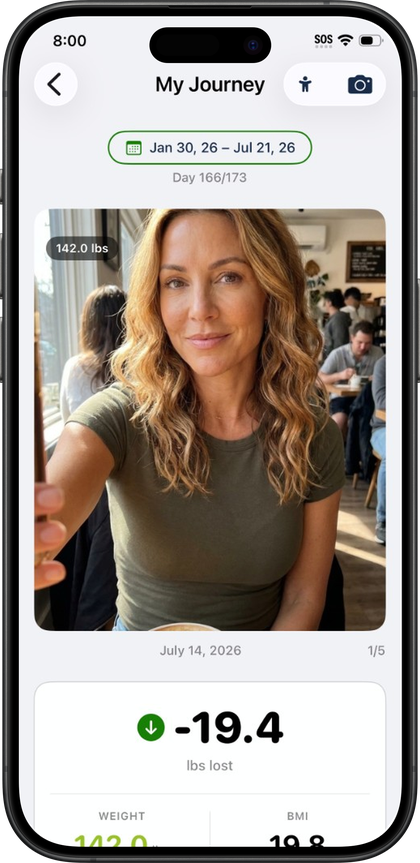
Week one: add your medication and log your first shot
Start with onboarding, which walks through your goals, whether you're on an injectable or oral medication (or still deciding), medication and schedule setup, height, weight, and target weight, a comparison chart, and a personalized projection based on what you enter. Near the end it offers to connect Apple Health and turn on notifications, so it's worth having those decisions in mind before you get there.
Pick your medication from Pokii's built-in library, which covers branded and compound GLP-1 and GIP entries, including Zepbound, Wegovy, Wegovy Pill, Foundayo, Mounjaro, Ozempic, Tirzepatide (Compound), Semaglutide (Compound), Retatrutide, Saxenda, Rybelsus, Victoza, Trulicity, CagriSema, Bydureon, and Tanzeum, each with a default dose color already assigned. Add custom medications with their own half-life, Tmax, and bioavailability when your regimen isn't in the library, and track more than one active medication when you need to. Next, set up the schedule for that medication: choose an interval or specific weekdays, add per-weekday doses if your regimen varies, set a custom next-shot date if you're mid-cycle already, and pick a reminder time.
Once setup is done, log your first shot from the floating log action button. A shot entry records the date, time, medicine, dose, and any notes, with a full edit history if you need to fix something later. For injectable medications, logging brings up an injection site body map with front and back views, rotation settings, and a suggested next site, plus an optional pain slider. Oral medications skip both since neither applies. If your pen needs to warm up first, the shot-day flow includes room-temperature timer presets with a countdown and alarm before you inject. Pokii's Get Started guide sticks around for a bit after onboarding with coach tooltips and small celebrations for milestones like this first logged shot, so the first week has some built-in guidance rather than an empty log.
Building the daily check-in habit
The daily check-in is where the first month earns its value, and it's optional, so it's worth deciding now to actually use it. It covers side effects with an intensity slider per effect, appetite, mood, and notes, and shows relative-to-last hints so you can see how today compares with your last entry. You can manage which side effects appear in the list and how visible each one is, so if nausea and fatigue are what you're watching for, trim the list down to what's actually relevant to you rather than scrolling past effects you're not experiencing.
Appetite gets its own dedicated slider rather than being folded into a generic side-effect tag, which matters in the first month since appetite change is often the first thing people notice and want a record of. Water tracking is glass-based with quick add and a daily goal, with optional confetti when you hit it, pulling into the same nutrition and water totals that come from Apple Health if you connected it during onboarding. Everything you log in that day's check-in, along with shots, photos, and scans, shows up together in the dashboard's Today's log section, so you can see the whole day at a glance rather than digging through separate tabs.
None of this needs to be elaborate. A short daily entry, even on a day with nothing notable to report, is what makes the "relative to last" comparisons and later PDF reports actually useful, since sparse logging in week one just means fewer data points to look back on.
Turning on reminders instead of relying on memory
Shot reminders are set per medicine from whatever reminder time you chose during schedule setup, so once that's done each medication keeps its own notification independent of the others. There's also a daily check-in reminder, which is time-based and automatically skips itself on days you've already checked in, so it won't nag you after the fact. Shot reminders and the daily check-in reminder are both built in.
The dashboard backs these up with overdue and shot-day banners that appear when a dose is due or late, with a deep link straight back to reschedule or log it, so a missed notification doesn't mean a missed dose goes unnoticed. If you're using the room-temperature timer on shot day, its alarm sound is configurable in settings along with other timer sounds. Together, the shot reminder, the check-in reminder, and the overdue banner cover the two things people most often forget in month one: taking the dose on schedule and actually filling in the check-in afterward, without needing to keep either one in your head.
Reviewing your first month
Once you've got a few weeks of shots and check-ins logged, the calendar tab is the easiest way to look back. It has a month view and a list view showing shots, check-ins, photos, weight, body measurements, and food scans all in one place, and tapping any entry opens it for editing if something needs a correction. That view is also where you'll notice patterns worth bringing up with a prescriber, like which days side effects tend to cluster around your shot.
The projected medication levels chart, showing an educational curve of your levels between doses, is available on the dashboard from day one in Pokii, with combined, per-medication, and per-compound display modes. It's a modeled estimate rather than a lab result, but paired with your logged shots and weight check-ins it gives useful shape to the first month.
If you're heading into a follow-up appointment, Pokii's configurable PDF progress report is worth generating once you have a month of data. It can include projected levels, weight and target weight, shots, injection sites, pain, side effects, appetite, mood, notes, the daily log, and body measurements—you choose which sections to include—and previously generated reports are saved in-app so you can pull up the same one again later. You still have full in-app charts and history for the same period; generate the PDF when you want a shareable summary for the visit.
Always follow your prescriber’s instructions for GLP-1 medications. Pokii helps you log and visualize your journey; it does not replace professional care.