You stepped on the scale, logged 150 lbs, and your progress line is sitting at 152. Or your projected weight for tomorrow says 151. That's confusing — here's what's actually going on, and why it's working as intended.
The smooth curve on your chart isn't drawn by simply connecting your weigh-ins. It's a trend line — calculated from your full weight history to show the direction your weight is actually heading, smoothed out so that one heavy meal, a salty day, or normal daily fluctuation doesn't create a jagged, misleading chart.
Day-to-day weight can swing 2–4 lbs for reasons that have nothing to do with fat loss or gain. The trend line filters that noise so you can see what's really happening over time.
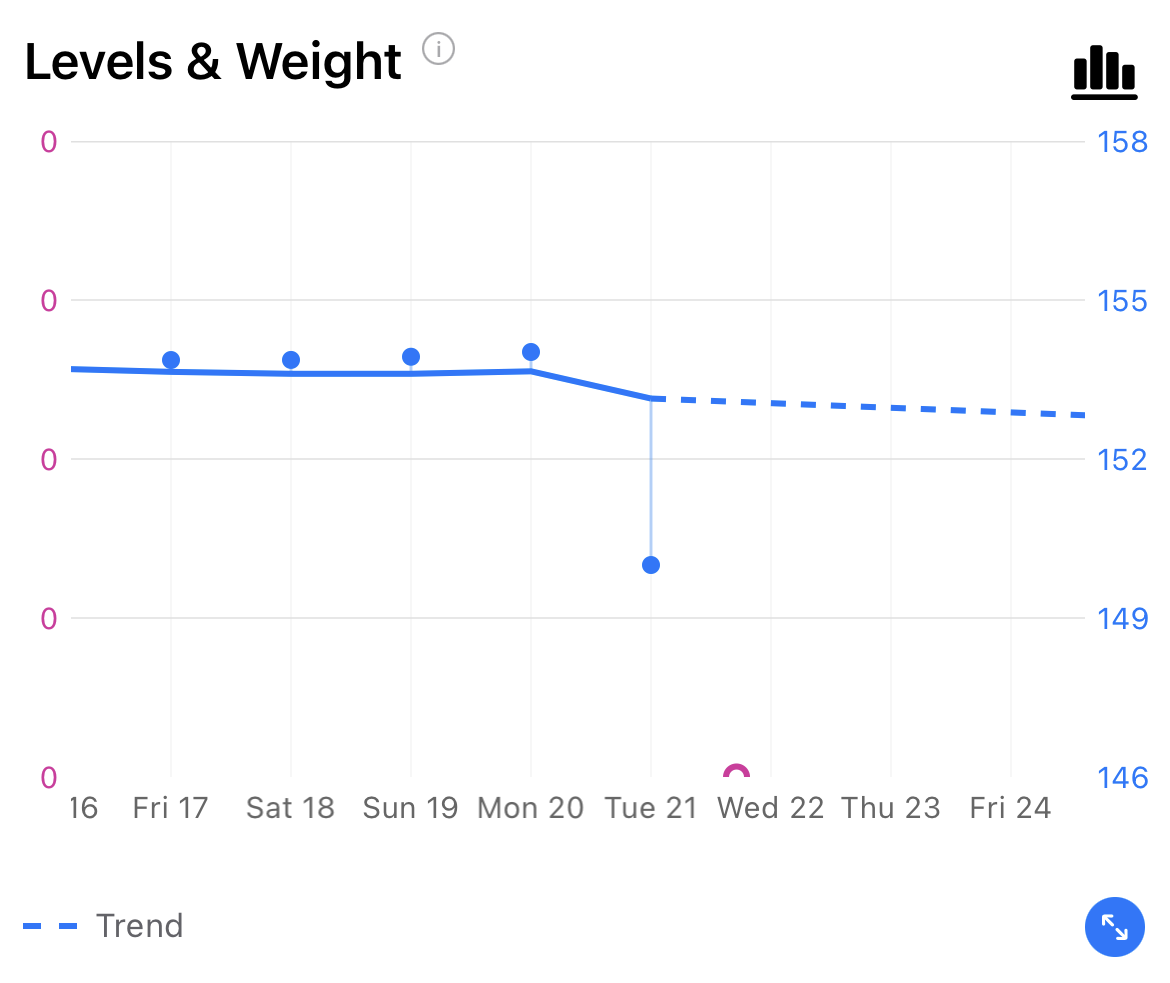
Pokii uses your most recent weigh-in to pull the end of the progress line toward your actual recorded weight. If your reading looks consistent with your recent pattern, the line will land right at your number and the projected line picks up from there.
The further your latest reading is from your recent trend — and the more variable your weight has been — the less the line adjusts. This is intentional. A single reading that's way outside your normal range is more likely to be a temporary fluctuation than a sudden real change, and the chart treats it that way.
In short: If your last weigh-in is close to your trend, the line snaps to it. If it looks like an outlier compared to your recent history, the line stays closer to the trend and catches up as more data comes in.The projected line starts from wherever the progress line ends. If the progress line ended slightly above your most recent reading — because that reading looked like a dip outside your normal range — the projection starts from that higher point and trends toward your actual recent weight over the following days.
This isn't the chart saying you're going to gain weight. It's the chart accounting for the fact that one low reading often bounces back a little before your real trend catches up.
Usually within a few weigh-ins. The more consistently you log, the faster the trend line reflects your actual progress. If you've had a real change — new dose, different routine, dietary shift — the line will follow it, just with a short lag as the algorithm gains confidence that the change is real and not noise.
Tip: Weighing yourself at the same time each day (first thing in the morning works well) gives the trend line the most consistent data to work with, which means fewer surprises on the chart.If your progress line looks significantly off and you've been logging consistently, reach out through Settings → Support & Data → Contact Support and we'll take a look.